SOA 12c - HelloWorld Rest Service
Information that you need to know:
The next images are the SOA Project execution:


We need to start the JDeveloper IDE.
Click on File menu, then click on New option, followed immediately by Application option.
For Example:
Then on the New Gallery window, choose Applications option in General Category, then choose SOA Application item.
For Example:
On the Application window, set the next values, and click on next button.
| Application Name | helloWorldRest |
| Directory | C:\JDeveloper\mywork\helloWorldRest |
| Application Package Prefix |
For example:

On the Project window, set the next values, and click on next button.
| Project Name | helloWorldRest |
| Directory | C:\JDeveloper\mywork\helloWorldRest |
For Example:

On the Configure SOA settings window, set the next values, and click on finish button.
| Standard Composite | Empty Composite |
For example:

After clicking on finish button, the JDeveloper IDE has the next appearance:

Then the next step, we need to select the BPEL Process component, this component is located on the right side, on Components section, when you found this, select it and drag it to Components section on work area.
For Example:
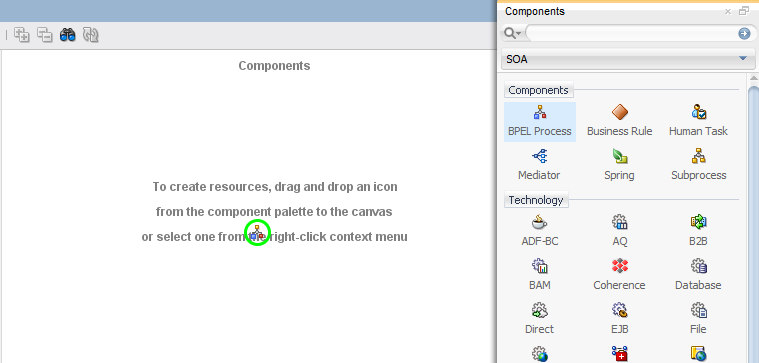
On the Create BPEL Process window, set the next values, and click on ok button.
| BPEL Specification | BPEL 2.0 Specification |
| Name | HelloWorldRestBPELProcess |
| Namespace | http://xmlns.oracle.com/helloWorldRest/helloWorldRest/HelloWorldRestBPELProcess |
| Directory | C:\JDeveloper\mywork\helloWorldRest\helloWorldRest\SOA\BPEL |
| Template Type | WebService |
| Template | Synchronous BPEL Process |
| Service Name | helloworldrestbpelprocess_client |
| Expose as a SOAP Service | Unchecked |
| Transaction | required |
| Input | {http://xmlns.oracle.com/helloWorldRest/helloWorldRest/HelloWorldRestBPELProcess}process |
| Output | {http://xmlns.oracle.com/helloWorldRest/helloWorldRest/HelloWorldRestBPELProcess}processResponse |
For example:


Now we are going to do right click on the inbound arrow on the bpel and choose the option Expose as REST
For example:

Then on REST Binding Configuration window (Step 1), enter the RestService value, you can change the value if you like, click on next button.
For example:

Then on REST Binding Configuration window (Step 2), configure the Resources. In the Resource Path click on edit button and enter resource name SimpleRequest and click on ok button.
For example:


Then click on edit button on Operation Bindings.
Then on REST Operation Binding window, select POST as HTTP Verb and In the Request tab check JSON as payload.

In the Response tab check JSON as payload. Click on ok button.
For example:

Resources and Operation Bindings gets configured. Click finish button.

Now the BPEL component gets exposed as REST Service.

Now we are going to do double click on component: HelloWorldRestBPELProcess. Automatically the .bpel tab is displayed, this is the work area of the BPEL component.
For example:

We need to drag the Assign activity to work area between receiveInput and replyOutput components.
For example:

Now we need to double click on AssignReplyOut activity.
Then on Edit Assign window, we are going to assign the value of the input variable to the result variable, the purpose of this is to identify if our payload works well, since our input will be in json format, and at the end from the execution it will return a json format again.
JSON (Request) --> BPEL (XML) --> JSON(Response)

Now the next step is create a jar file to can deploy it on WebLogic Server, we need to select the helloWorldRest project and right click, then chose the helloWorldRest... option.

| Deployment Action | Generate SAR File |
For example:

On the Deployment Configuration window, set the next values, and click on next button.
| New Revision ID | 1.0 |
For example:

On the Deployment Summary window, click on Finish button.
For example:

If all steps were successful, then you will view on yours JDeveloper IDE the correctly deployment.
For example:


Comments
Post a Comment